That vocabulary isn't academic decoration. It describes what the reader sees, how the eye moves, how much time a moment appears to take, and whether your finished page survives the transition from screen to print. This guide treats graphic novel terminology as a practical creator's toolkit, with definitions connected to the decisions you make while scripting, laying out, lettering, generating, and preparing pages.
Why Graphic Novel Terminology Matters for Every Creator
A beginner often starts with a single image in mind. A detective stands beneath a streetlamp. A child opens a mysterious door. Two friends argue across a kitchen table. The difficulty begins when that image has to become a page that controls attention.
Should the moment occupy one large panel or several smaller ones? Should the character's dialogue sit inside a speech balloon, or should a caption describe what the character remembers? Should the artwork stop inside the page boundary, or continue beyond it for trimming? Without shared terms, these choices feel random. With them, you can describe exactly what you want.
A panel is not merely “a box.” A gutter isn't wasted space. Bleed isn't a decorative effect. Each word identifies a production decision that affects storytelling, collaboration, and output quality.
Vocabulary turns intention into instructions
Suppose you're working with an illustrator, editor, letterer, or AI comic platform. “Make this page more dramatic” leaves room for several interpretations. “Use a full-page splash with the character low in frame, leave clear space for a caption, and let the background bleed to the page edge” gives the collaborator a usable brief.
That precision also helps when you're comparing graphic novel software. A tool may generate attractive artwork, but you still need to know whether it gives you control over panel count, dialogue placement, page dimensions, and print preparation.
Production terms prevent avoidable mistakes
A page can look correct on a monitor and still print poorly if text sits too close to the trim line or important artwork is cut away. A creator who understands the difference between a gutter and a margin can diagnose a layout problem quickly instead of adjusting elements blindly.
Working rule: Learn the term, then connect it to a visible decision on the page.
Keep this glossary nearby while you work. The goal isn't to memorize jargon for its own sake. The goal is to make each visual choice deliberate, explainable, and easier to revise.
Core Page Structure Terms Every Creator Must Know
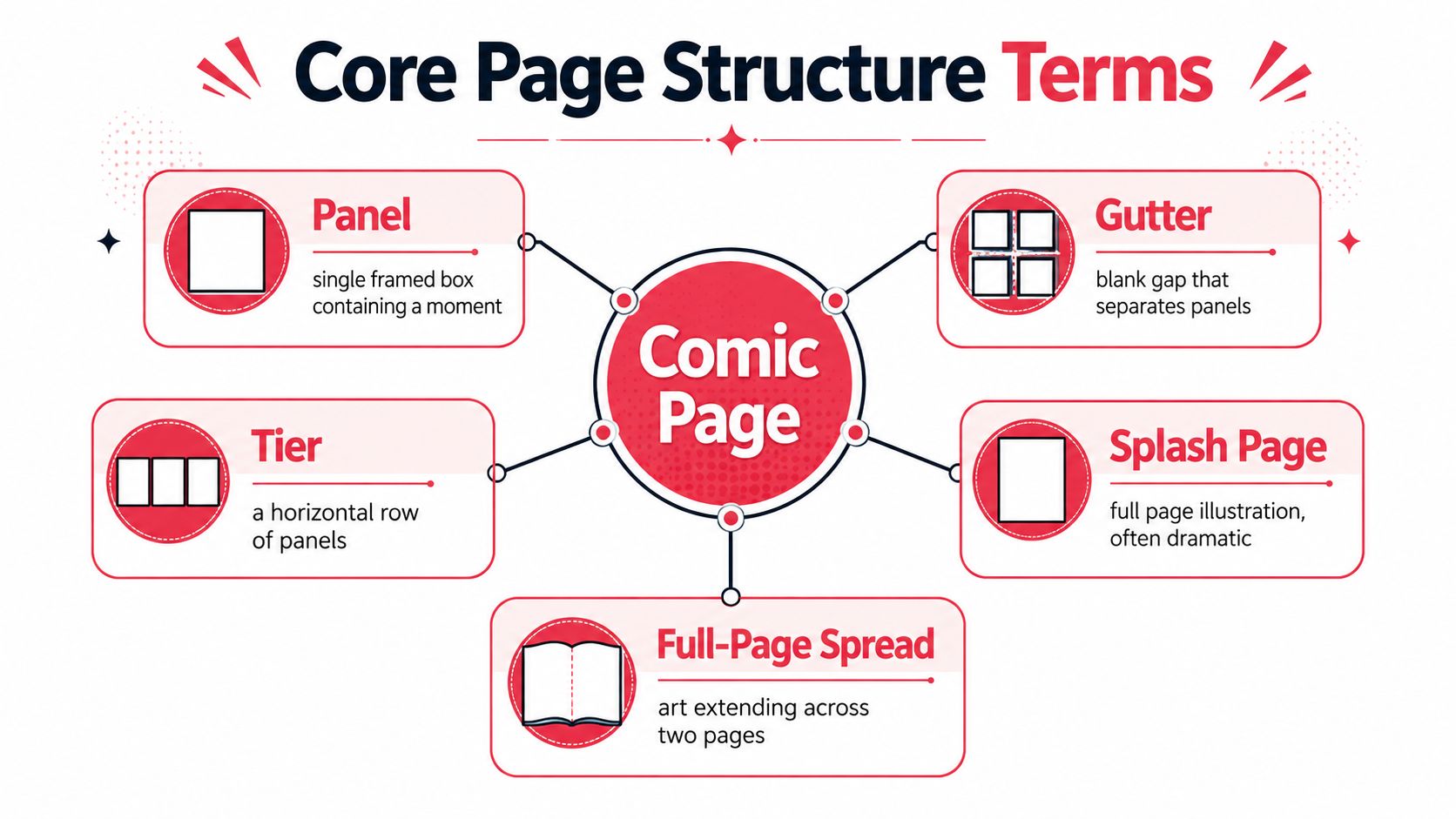
Every comic page is built from a small set of visual components. The most important are the panel, gutter, tier, splash page, and full-page spread.
Panel and frame
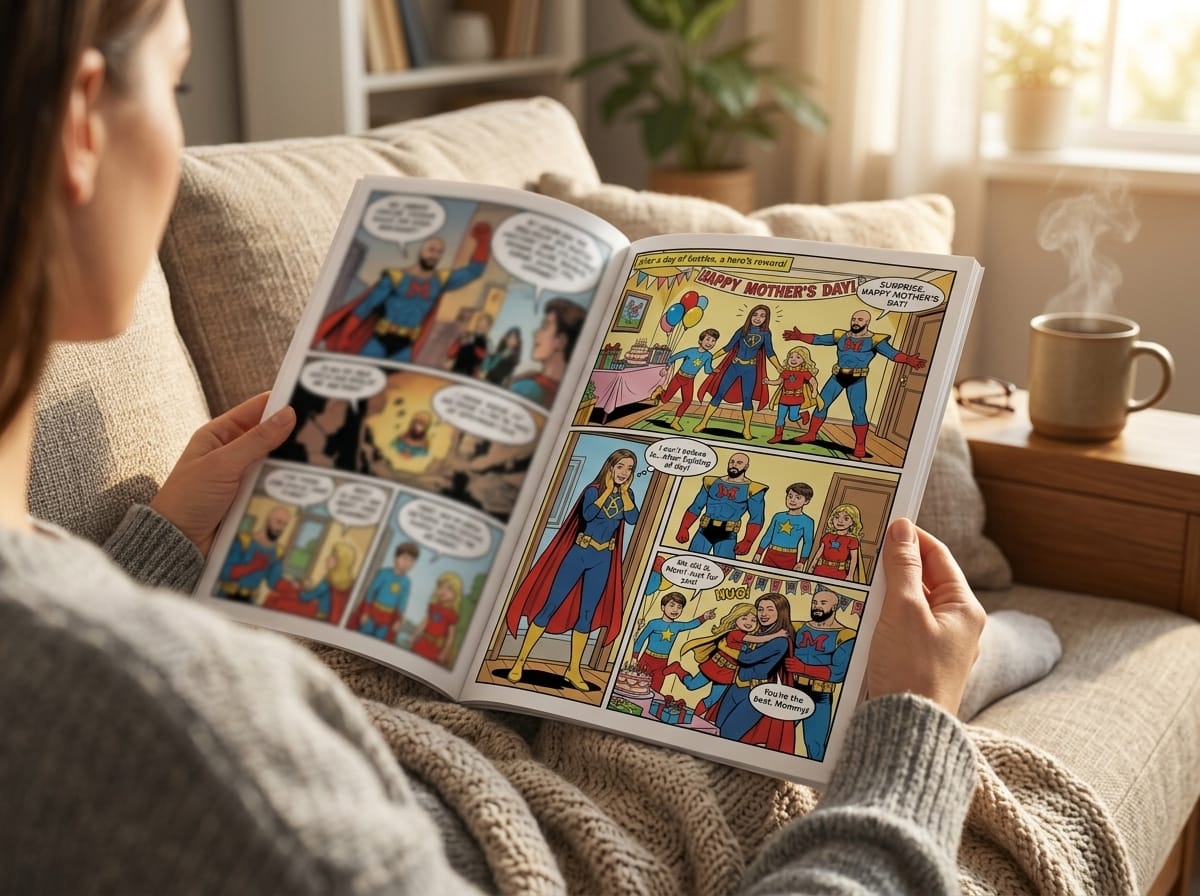
A panel, also called a frame, is a single image area containing a moment, action, location, or reaction. A page might show a close-up of a hand turning a key, followed by a wider view of the door opening. Each framed unit is a panel.
Panel borders can be clean and rectangular, angled, rounded, irregular, or absent. A rigid border often supports order and clarity. A broken or borderless panel can suggest memory, motion, dream imagery, or an event that refuses to stay contained.
Gutter and tier
The gutter is the space between panels. Readers don't merely skip over it. They infer what happens between the images, which makes the gutter an active storytelling space. A character raises a glass in one panel and the glass lies shattered in the next. The reader supplies the missing action.
A tier is a horizontal row of panels. Tiers help organize the page and give the eye a predictable path, especially in layouts with several rows. You can explore how page dimensions affect these arrangements through this guide to comic book page size.
Splash page and full-page spread
A splash page is a page dominated by one large panel, often used for a dramatic reveal, setting, entrance, or emotional pause. A full-page spread extends one illustration across two facing pages. The center fold becomes part of the composition, so don't place a character's face or essential lettering directly on the spine.
Think of these terms as choices about attention. Multiple panels divide time into steps. A splash page gives one moment room to dominate. A spread expands the visual field and can make the reader pause before continuing.
Panel Layout and Composition Vocabulary
Once you know what a panel is, the next question is how panels cooperate. Panel layout determines not only what the reader sees, but also how quickly the reader moves through the page.
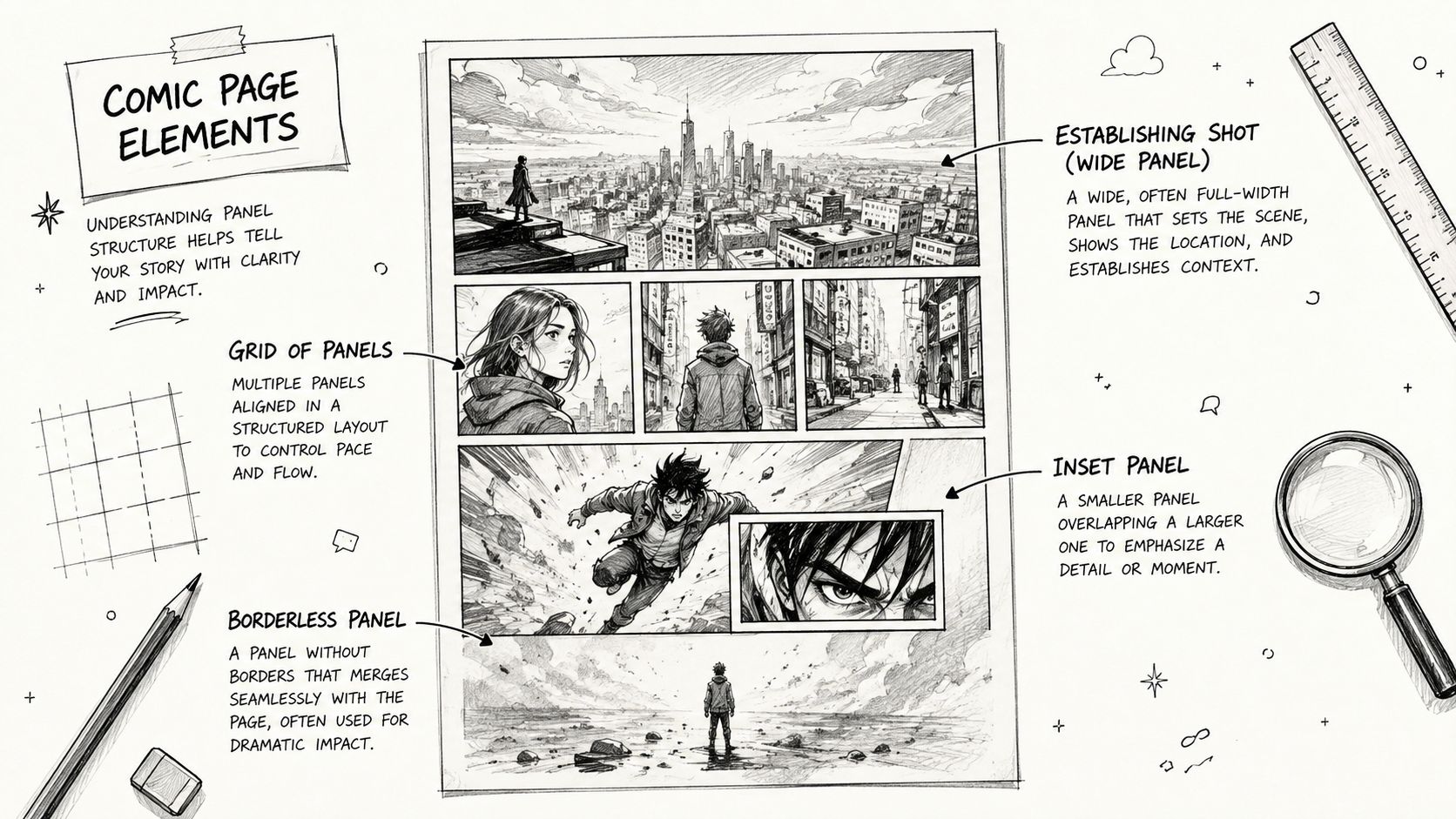
A grid layout uses repeated rows and columns. It gives the page a stable rhythm, which works well for conversations, procedural sequences, or scenes where each beat deserves similar weight. A page with small, uniform panels can make action feel quick and continuous because the reader processes frequent visual changes.
A large panel does the opposite. It gives the eye more space to explore and can make a moment feel slower, heavier, or more important. This isn't a mechanical rule. A crowded large panel may feel frantic, while a simple small panel can hold a quiet pause. Size establishes emphasis, but content and contrast complete the effect.
Useful layout variations
- Inset panel: A smaller panel placed inside a larger panel. It can show a detail, such as a fingerprint on glass or a character's tightening grip, without abandoning the larger setting.
- Overlapping panels: Panels that intrude into one another or share visual space. They can create depth, connection, or controlled visual tension.
- Borderless panel: An image without a visible frame. It may blend with the page or another panel, making the transition feel less rigid.
- Establishing shot: A wider image that identifies the location and situation before the story moves into closer views.
- Tier: A horizontal row that can contain one panel or several. Its width and height influence the page's rhythm.
When you use an AI comic platform, specify composition rather than asking only for “a comic page.” State the desired number of panels, reading order, camera distance, whether the page uses a grid, and whether a key image should dominate. If you need an inset panel, name the subject and its position. If you want a borderless memory image, say so directly.
The comic panel layout generator can help you think in these structural terms before you commit to final artwork. Treat the generated arrangement as a draft to evaluate, not as a substitute for deciding what the reader should notice first.
Text and Dialogue Terminology for Comics
Words in comics have both a visual role and a storytelling role. The same sentence can feel intimate, comic, threatening, or official depending on its container, lettering, and position.
A speech balloon, also called a word balloon, contains dialogue spoken aloud by a character. Its tail points toward the speaker, though the pointer must remain clear enough that readers can identify the speaker without hesitation. A thought balloon traditionally represents private thought, often through a cloud-like shape or a sequence of small bubbles.
A caption or narration box contains text presented outside the immediate spoken exchange. It may identify a location, mark a time shift, provide a narrator's voice, or reveal information unavailable to the characters. Speech balloons belong to the story world as audible dialogue. Captions may come from a narrator or editorial viewpoint outside that moment.
Lettering choices carry tone
Lettering includes the arrangement and styling of text on the page. Font shape, size, spacing, balloon outline, and placement all affect interpretation. Rounded lettering can feel friendly. Heavy, uneven lettering can suggest shouting, panic, or mechanical noise. A sound effect, known as onomatopoeia, turns a noise into visible design, such as a crash, buzz, or rumble.
Write dialogue with the balloon in mind. Shorter lines are easier to place and read than dense paragraphs squeezed into a small shape. Leave visual breathing room around words, and don't cover a character's eyes, hands, or the action that gives the dialogue meaning.
When an AI tool generates balloons, describe the intended text hierarchy and sound-effect treatment. Ask for readable speech balloons, clear speaker tails, and sound effects that match the scene's energy. Always proofread the final lettering. Image generation can mishandle spelling, punctuation, and character attribution even when the artwork is strong.
Print Production Terms That Affect Digital Creators
Digital pages still need print vocabulary if you might order physical copies. The central distinction is between the area you design and the area that remains after a printer cuts the sheet.
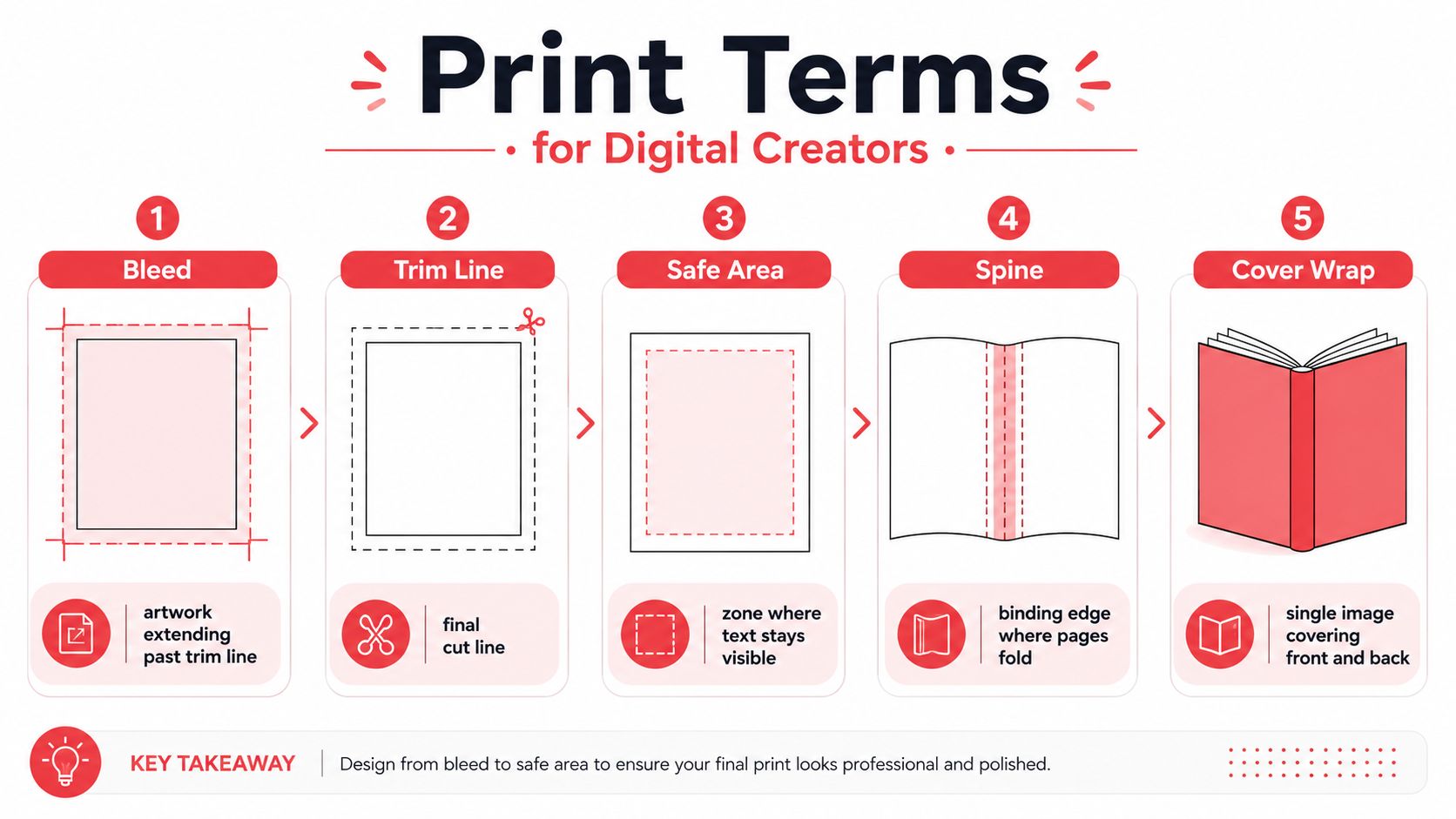
Bleed is artwork that extends beyond the final page boundary. The extra image gives the printer room to trim without leaving an unintended white edge. The trim line marks the expected final cut. A background that reaches the bleed can safely become an edge-to-edge image, while text should remain inside the safe area, the region where important content is less likely to be cut or obscured.
Interior pages and covers use different logic
The spine is the binding edge where pages meet or fold. A cover wrap is a continuous cover image designed to extend across the back cover, spine, and front cover. The composition must account for folding and alignment, so a single image that looks balanced on screen may need careful positioning for print.
For digital reading, bleed may appear irrelevant because there's no physical trimming. It still matters if your digital artwork is later repurposed for a printed edition. Trim and safe-area thinking also improves consistency because it keeps text and important faces away from unstable edges.
PersonalizedComics generates illustrated comic pages from photos and story inputs, including panels, speech bubbles, sound effects, and narration. If you use it or another platform, confirm which export and print-preparation tasks the service handles, then plan your artwork around the required page and cover specifications rather than assuming every layout will be print-ready automatically.
Pacing and Visual Flow Concepts
A comic controls time through pacing, the rate at which the reader moves through actions, reactions, discoveries, and pauses. Panel count, panel size, gutters, captions, and page turns work together to create that rate.
A beat is a meaningful story moment. It might be a glance, a decision, a sound from another room, or the instant a secret becomes visible. A sequence that gives each beat its own panel feels more measured than one that combines several beats into a single image.
The page turn is a particularly powerful pacing tool. A creator can place a question, warning, or partial view at the bottom of one page, then reveal the answer on the next. A splash panel or full-page image can function as a visual pause because the reader encounters one dominant image instead of a chain of smaller steps.
Transition types
Comics commonly describe movement between panels through several transition categories:
- Moment-to-moment: A small interval, such as a character turning their head.
- Action-to-action: One action leads to another, such as reaching for a handle and opening a door.
- Subject-to-subject: The reader shifts between people or objects within the same setting.
- Scene-to-scene: The story jumps across time or location.
- Aspect-to-aspect: The page explores details, atmosphere, or a setting without a single continuous action.
Gutter width can influence how separate two moments feel. A narrow gap may encourage continuity. A more pronounced separation can make the jump feel deliberate, though border design and panel content also matter.
When prompting an AI comic tool, specify the intended rhythm. “Three panels showing preparation, hesitation, and discovery” communicates more than “draw a dramatic scene.” Mention whether the page should end on a reveal, use a quiet establishing image, or accelerate through repeated action panels. You're directing the reader's experience, not merely requesting illustrations.
Format and Category Definitions
Creators often use publication terms as if they were interchangeable. They aren't always treated consistently, but each one points toward a different kind of object, release pattern, or story structure.
A graphic novel generally means a book-length comic narrative presented as a complete work. Britannica describes it as a text combining words and images, usually in book form rather than as a magazine or serial. Library guidance similarly treats it as a stand-alone, complete narrative in comic style, whether fiction or nonfiction, original or adapted. See the Britannica definition of graphic novel for the format distinction.
A comic book usually refers to a periodical or issue-based publication, although everyday usage is broader. A trade paperback is a softcover collection, often gathering previously released material, but the label can also describe a bound comics edition in retail contexts. A one-shot tells a story in a single publication. A miniseries unfolds across a planned run of issues. An anthology brings together separate stories, creators, or excerpts. Sequential art is the broader technique of arranging images in sequence to communicate narrative or information.
| Format | Typical Length | Binding | Story Structure |
|---|---|---|---|
| Comic book | Issue-based, length varies | Stapled or digital presentation | Serial, episodic, or complete |
| Graphic novel | Book-length, length varies | Hardcover, paperback, or digital | Usually self-contained |
| Trade paperback | Collected book edition | Softcover | Often collected serial material |
| One-shot | Single release | Stapled, paperback, or digital | Complete story |
| Miniseries | Planned issue run | Issues or later collection | Story divided across releases |
| Anthology | Multiple contributions | Paperback, hardcover, or digital | Separate stories or segments |
A collected series can be called a trade paperback because of its binding and collected status, while a retailer or reader may also call the same volume a graphic novel because it's sold as a book. Describe both the story structure and the physical format when accuracy matters.
Common Terminology Mistakes and How to Avoid Them
Terminology errors usually happen because creators use a word for the whole object when it names only one part. The fix is simple: identify the level of the thing you're describing.
Panel versus page
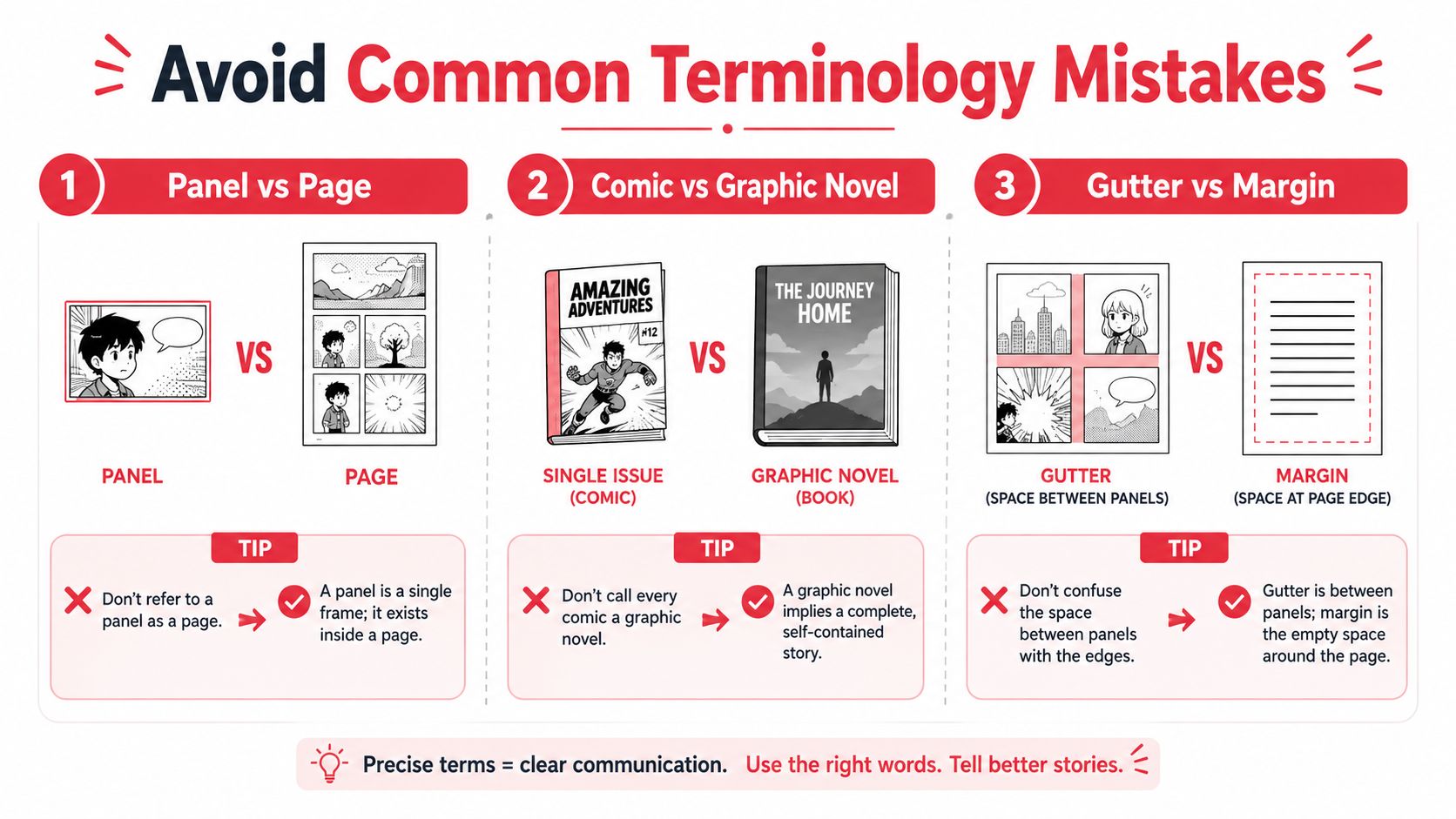
A panel is one framed moment inside a page. A page is the complete surface that may contain several panels, one splash panel, captions, sound effects, and gutters.
Incorrect: “The third page shows the character opening the door,” when you mean the third panel.
Correct: “The third panel on the page shows the character opening the door.”
Comic book versus graphic novel
Calling every comics publication a graphic novel can create confusion about delivery and story structure. The term generally signals a complete, book-length work, while comic book often points to a periodical or issue format. Usage isn't universal, so add a clarifying description when speaking with a printer, librarian, or bookseller.
Incorrect: “This is a graphic novel,” with no explanation for a serial issue.
Correct: “This is the first issue of a miniseries,” or “This is a collected book containing a complete story.”
Gutter versus margin
The gutter sits between panels. The margin is the space between the page content and the page edge. They solve different problems. The gutter separates narrative units, while the margin protects artwork and text from the physical edge.
Use these checks before sending a file:
- Location check: Is the space between panels, or around the outside of the page?
- Object check: Are you naming one image unit, or the entire page?
- Format check: Is the work complete and book-length, or released serially?
- Print check: Does the artwork extend beyond the trim, and does the text stay inside the safe area?
Precise language shortens revision cycles because collaborators can act on your description without guessing what you meant.
Quick Reference Glossary by Creation Stage
Use this list while working. The definitions are brief by design, with the detailed concepts grouped according to when they usually become useful.
Planning and scripting
- Graphic novel: A book-form comics work that generally presents a complete narrative. See Format and Category Definitions.
- Sequential art: Storytelling through arranged images and related text. It's the broadest term in this glossary.
- Beat: A meaningful story moment that may deserve its own panel.
- Transition: The relationship between consecutive panels, such as action-to-action or scene-to-scene.
- One-shot: A single-release story intended to stand on its own.
- Miniseries: A planned story divided across multiple releases.
- Anthology: A collection of separate stories or contributions.
Page layout and composition
- Panel or frame: A single framed image area containing a moment.
- Gutter: The space between panels, where readers infer change or action.
- Tier: A horizontal row of panels.
- Grid layout: A regular arrangement of rows and columns.
- Inset panel: A smaller panel placed inside a larger image.
- Establishing shot: A wide image that identifies the setting.
- Splash page: A page dominated by one large panel.
- Full-page spread: Artwork extending across two facing pages.
Dialogue and lettering
- Speech balloon: A container for spoken dialogue.
- Thought balloon: A traditional container for private thought.
- Caption or narration box: Text outside the immediate spoken exchange.
- Word balloon tail: The pointer connecting dialogue to its speaker.
- Lettering: The design and placement of comic text.
- Onomatopoeia: A written sound effect treated as visual art.
Print preparation
- Bleed: Artwork extending past the final trim.
- Trim line: The intended cut boundary.
- Safe area: The protected region for important text and imagery.
- Spine: The binding edge of a book.
- Cover wrap: One cover image extending across back, spine, and front.
Publication and distribution
- Comic book: Often an issue-based or periodical comics publication.
- Trade paperback: A softcover collected edition.
- Complete narrative: A story presented as a stand-alone work, whether in one volume or more than one volume.
- Edition control: Tracking the exact version, format, and contents of a published work for consistent cataloging and distribution.
The Ongoing Debate About What Defines a Graphic Novel
The phrase graphic novel sounds precise, but its boundaries remain flexible. Some people use it for a self-contained, book-length comics story. Others apply it to almost any non-periodic book that uses comics, including nonfiction, adaptations, anthologies, or collected serial material.
That disagreement has a practical history. The term was coined in 1964 by fan historian Richard Kyle, but it gained wider recognition later through milestones including Will Eisner's A Contract with God in 1978, the launch of Marvel Graphic Novel in 1982, and major public successes such as Maus volume 1 and The Dark Knight Returns in 1986, followed by Watchmen in 1987. The Book Industry Study Group adopted the phrase as a bookstore category in 2001, as summarized in this history of the graphic novel term.
The label therefore carries several meanings at once. It can describe format, story completeness, retail positioning, or an attempt to distinguish book-form comics from periodicals. Scholars, creators, librarians, and retailers may choose different terms for the same work depending on their purpose.
Library cataloging adds another layer. Guidance for cataloging graphic novels emphasizes complete comic-style narratives, including fiction and nonfiction, originals, compilations, and adaptations. For creators, the safest approach is descriptive rather than rigid. State whether the work is complete, collected, serialized, digital, paperback, or part of an anthology.
PersonalizedComics lets you turn photos and ideas into illustrated comic pages with selectable visual styles, characters, panels, speech bubbles, sound effects, and narration. Use the terminology in this guide to plan your page structure and print intentions, then visit PersonalizedComics to start creating your own story.
Filed under Comic Craft